Sitewise
Site to inbox.
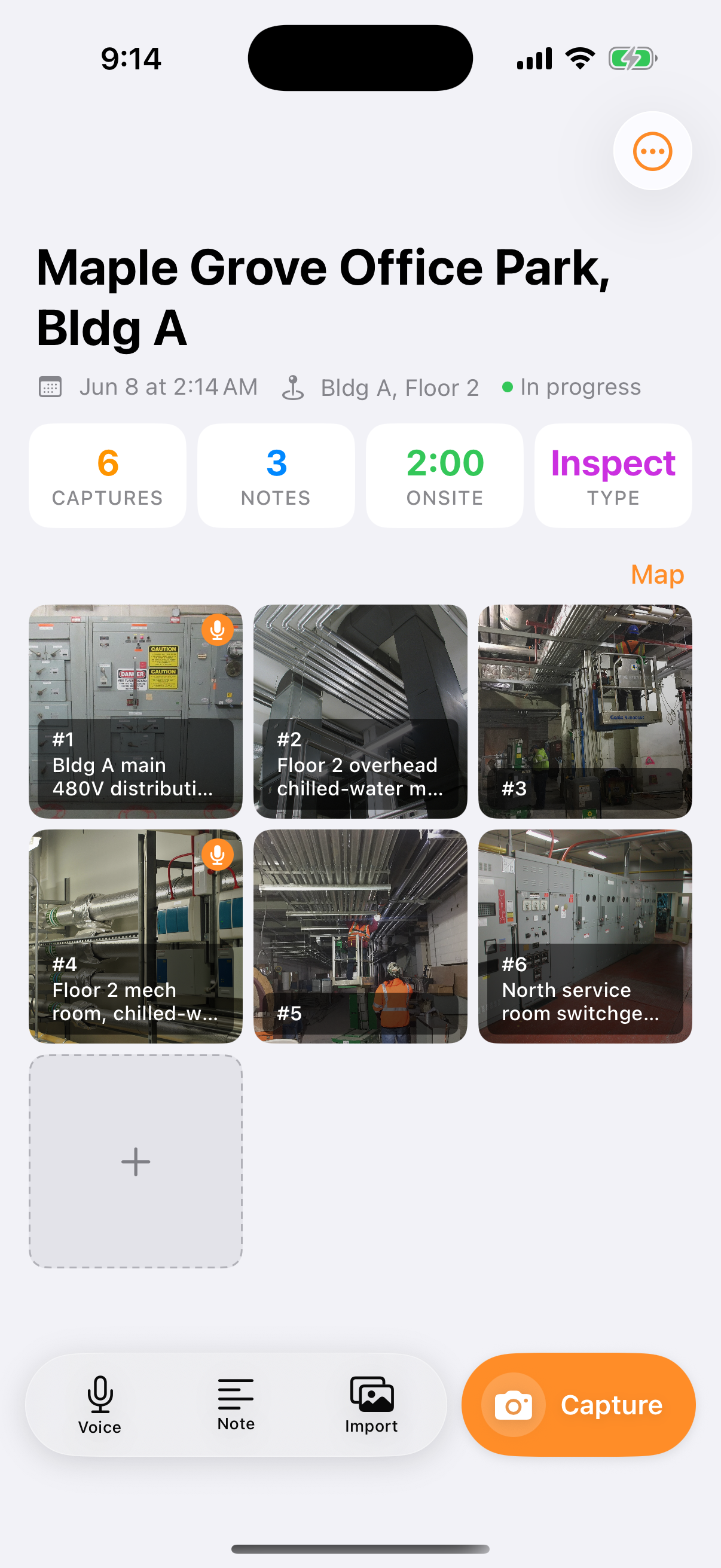
Photo, voice, sketch, and notes in one app. Capture the visit, ship the report before you leave the site.


Who it's for
Built for anyone who documents a site with a phone.
Inspectors, architects, engineers, general contractors, and field crews doing daily walks or punch-list closeout. If your report today starts with sorting through photos and trying to remember what you meant to write down, Sitewise is built to skip that step entirely.

What's in a capture
Everything you'd put in a notebook, minus the notebook.
A capture is a photo, a voice note, a sketch, a typed observation, or a measurement. Each one is timestamped the moment you make it, and pinned to where you were standing if you've granted location access.
Photo
Snap as many as you need. They land in the project timeline in the order you took them.
Voice
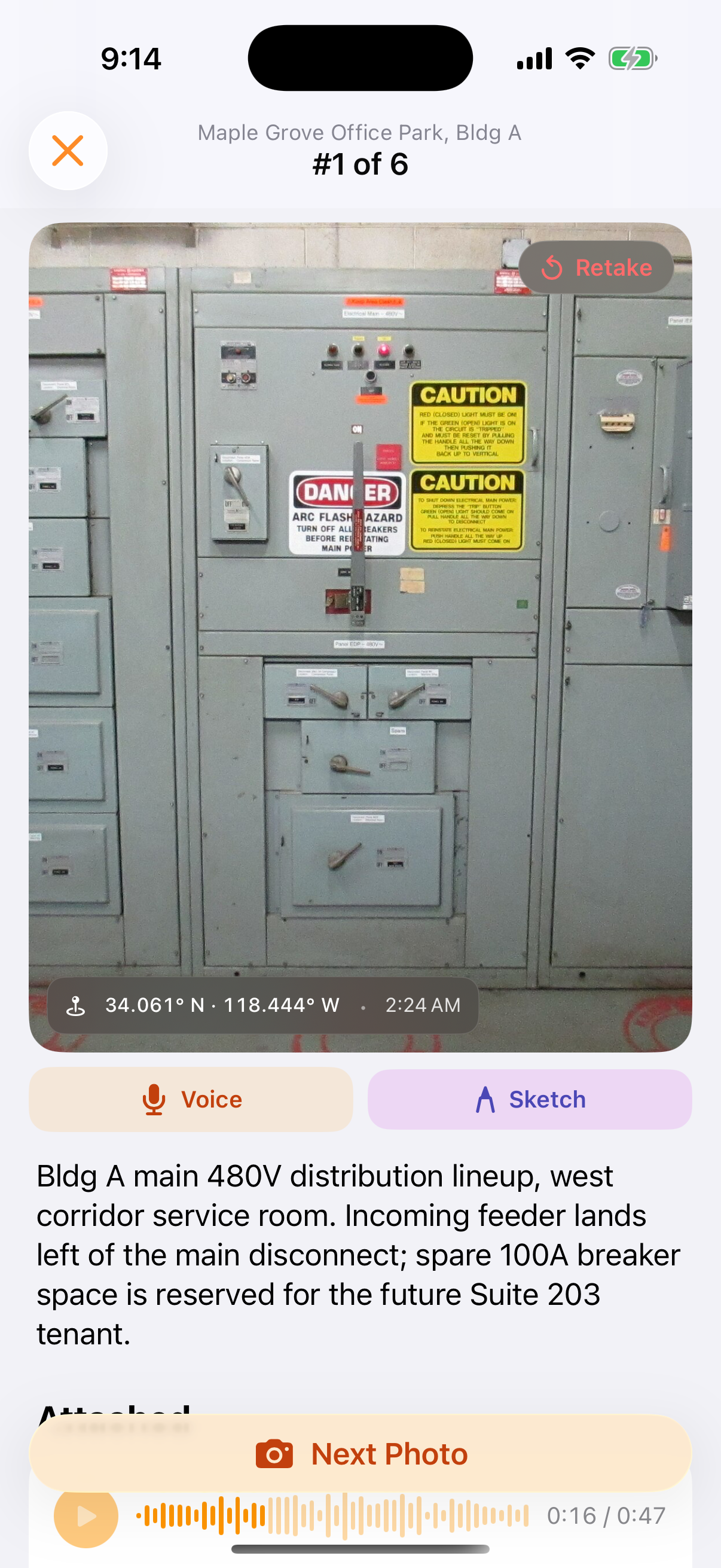
Talk through what you're seeing. It transcribes on-device the moment you stop, no upload and no wait.
Sketch
Mark up a rough diagram right on your phone. No extra gear to carry to the site.
Notes
Type a quick observation when talking or drawing isn't the right tool for it.
Measure
Tap two points in the camera on a Pro iPhone or Pro iPad with a LiDAR scanner. The dimension lands on the photo and in the report.
How it works
Three steps from arrival to inbox.
Capture
One tap to add photos, voice notes, sketches, and observations to a project. Works offline; everything syncs the moment you're back on cell.
Transcribe
Voice memos become transcribed into a note the moment you stop talking. No re-typing on the drive home.
Report
Tap export. A formatted PDF or DOCX is generated and ready to email before you leave the site.
Everything in the app
What the visit needs, and what it doesn't.
No scheduling, no budgets, no drawings package. Sitewise does the walk and the report, and does those completely.
Offline first
Captures save on the device and upload on their own once you're back on cell or Wi-Fi. A basement with no signal is a normal site.
Time and place on every capture
Each one carries the moment you took it and, with location on, a GPS pin. Open the map to see the visit laid out where it happened.
Sketch with a finger or a Pencil
Draw straight on the photo to point at the crack, the leak, or the missing sleeve. On iPad, Apple Pencil is a first-class input.
Measure on Pro devices
Two taps in the camera give a dimension in feet and inches or meters, drawn on the photo and printed in the report. Needs a LiDAR scanner, so a Pro iPhone or a Pro iPad; it refuses past about 5 meters, where the scanner stops being accurate.
Choose what ships
Reorder captures and pick which photos go in the report. The rest stay in the project, where you can still find them.
PDF or DOCX, from the field
A formatted report with photos, captions, sketches, dimensions, and transcripts in capture order, emailed before you leave. Previous reports stay attached to the project.
iPhone and iPad
One account, both devices. Sign in on a new device and the projects are there.
Private by default
Voice notes transcribe on the device, so the audio never leaves it for processing. No ads, and your captures never train a model.
On iPad
Bigger screen, same visit.
Projects sit in a sidebar with the capture grid beside them, photo review opens side by side, and sketches take Apple Pencil. Everything you captured on the phone is already there.

From the guides
How to write the report, and what to put in it.

Site visit report template
A site visit report template with the header fields, numbered observations and caption pattern that hold up in a dispute, plus a filled example and sample PDF.

Punch list template
A punch list template built to close items, not collect them: the six columns worth keeping, how to word an item so a sub can act on it, and a filled example.

The best site inspection apps for iPhone, checked in September 2026
Eight iPhone apps for site inspections and field reports, with what each one captures, what it exports and what it costs, checked against their own listings.
One trip, one report.
Try it on your next site visit. Capture as you go, and the report is done before you're back in the truck.