
Voice notes on site visits: dictate the observation, check the transcript
Updated November 5, 2026
Fill this in on your iPhone, on site, with Sitewise.
Get the appVoice notes are the fastest way to record a site observation when your hands are busy, but only if each note is short, says where you are, and gets read back as text before you walk away. Dictation saves time on site. An unchecked transcript costs it back later.
Dictation wins when your hands are full
Typing on a phone works fine at a desk. On site you are holding a tape against a wall, a torch into a ceiling void, a ladder, or a clipboard someone handed you. Gloves make the keyboard close to useless, and rain makes the screen worse.
Talking needs none of that. You can keep the tape where it is, read the measurement out loud, and say what is wrong while you are still looking at it. The last part matters most, because an observation described in front of the defect has details that an observation written up from memory at the end of the day has lost.
It is also quicker. For most people, talking beats typing on a phone even at a desk, and the gap grows with every glove and every cold finger.
One note per observation, attached to its photo
The common mistake is to start recording at the front door and stop at the car park. Forty minutes of audio has to be listened to again, at normal speed, and cut into pieces while you match each piece to a photo.
Record one note per observation instead, straight after the photo it belongs to. Ten to thirty seconds is usually enough. When the note is attached to the photo, nobody has to work out later which sentence goes with which picture, and the note picks up the same capture time as everything else in the visit.
If you find yourself talking for two minutes about one thing, it is probably two or three observations. Take another photo and start another note.
Say it in the same order every time
A spoken note drifts unless you give it a shape. Use the same four parts on every observation:
- Where: "Level 2, corridor outside 2.14, east wall."
- What: "Plasterboard wall lining, skim finish."
- What is wrong, in measurements: "Crack running diagonally from the door head, about 600 long, hairline at the top, 1 mil at the bottom."
- What happens next: "Monitor, recheck at next visit. Not urgent."
After a dozen notes this becomes automatic, and the transcripts start to read like report entries rather than thinking out loud. The location comes first on purpose. It is the part people forget when they start with the defect, and it is the part a trade arriving next month needs most.
Skip the filler. "Okay, so, this one here is..." ends up in the transcript and has to be deleted.
Say numbers and names the way they are written
Speech recognition is good with ordinary sentences and weak with the things that matter most in an inspection: numbers, codes and names. A few habits help.
- Say room and gridline references the way they are written: "room two point one four", "gridline C four".
- Give units every time. "Six hundred millimetres" is unambiguous; "six hundred" is not.
- Spell a product name or an unusual abbreviation the first time, or describe it instead: "the fire-stopping sealant around the pipe" rather than a brand name the recognizer has never heard.
- Pause at the end of each part. It gives the transcript a chance to break the sentence where you meant it to.
Done well, it sounds like reading a note to someone over a bad phone line.
Get the noise out of the way
Site noise is the main reason a transcript comes back as nonsense. A generator, a saw two rooms away, or wind across the microphone can swamp a quiet voice.
Turn your back to the wind and hold the phone closer to your mouth than feels normal, below your chin rather than in front of it. Step out of the room with the breaker running if the observation allows it. Speak a little louder and a little slower than usual. Most of the time that is the whole fix.
If the area is too loud to dictate at all, type a few words and come back to the note in a quieter spot. A short typed note is better than a long transcript you cannot read.
Read the transcript before you move on
Before you walk to the next observation, look at the text. Ten seconds is enough to catch "2.14" turned into "to 14", "C4" turned into "see for", or a measurement that came out as a different number.
Fix it there, while the defect is still in front of you and you know exactly what you said. The same correction at the desk that evening is guesswork, and on a long visit it is guesswork forty times over.
Keep your own words close to what the report should say. If the transcript reads cleanly, you may not need to rewrite it at all, and the report will carry the description you gave on site.
Keep it to your own observations
Voice notes work best as your record of what you saw. If a conversation on site matters, such as an instruction from the client or an agreement with a subcontractor, write down who said what and when in a typed note or a separate record, rather than recording the other person. Recording people without their agreement is a legal question in some places and an awkward one everywhere.
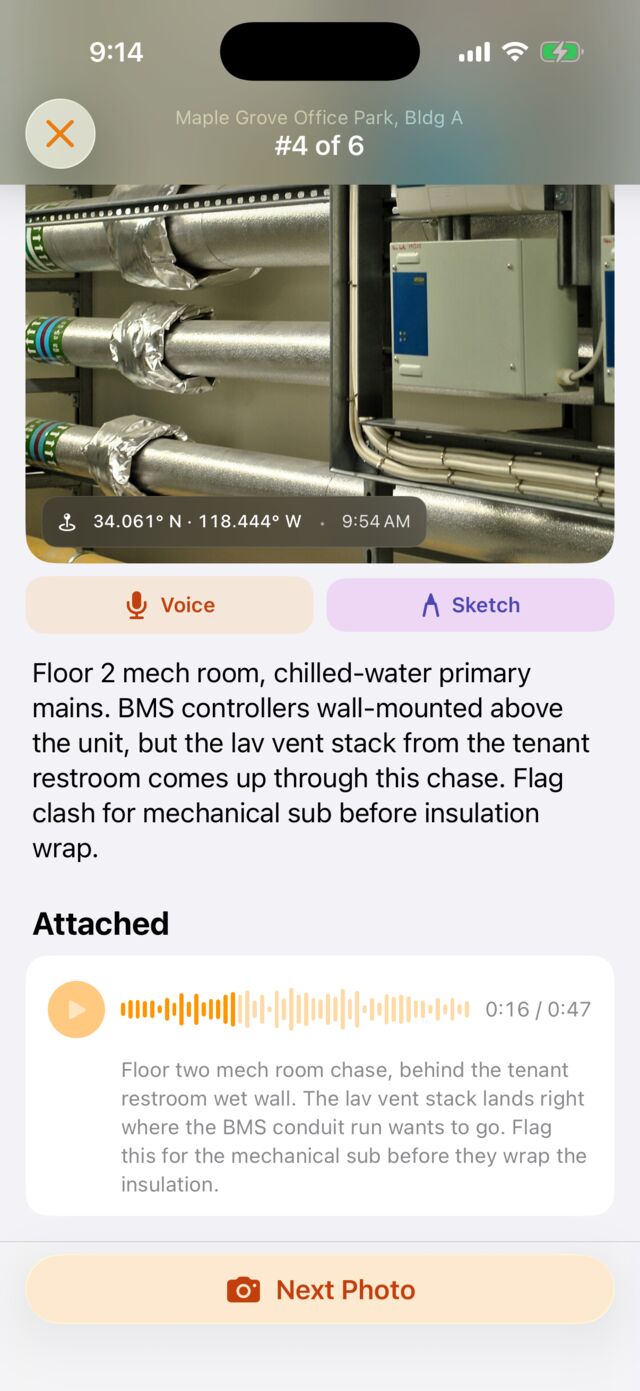
Sitewise puts the voice note on the photo it belongs to, on iPhone and iPad. You take the photo, tap to dictate, and the transcript appears under the image, alongside any sketch or typed note, each stamped with the time and, with location on, a GPS pin. It records and transcribes with no signal and syncs later, and the transcripts land in the PDF or DOCX report with their photos. It does not schedule visits, manage budgets, produce drawings or collect signatures.
For turning those notes into a finished report on site, see how to write a site visit report. For the layout the report should end up in, see the site visit report template.
Questions people ask
- Are voice notes accurate enough for an inspection report?
- For most observations, yes, as long as you read the transcript before you move on. Speech recognition is good with plain sentences and weak with room numbers, product names, abbreviations and anything said over machinery. A ten second check on the spot catches the errors while you can still see what you meant.
- What should you say in a voice note during a site inspection?
- Say the same things in the same order every time: where you are, what you are looking at, what is wrong with it in measurements, and what needs to happen next. A fixed order means the transcript reads like a report entry rather than a stream of thought, and it means you do not forget the location.
- Should you record one long voice note or many short ones?
- Many short ones, one per observation, each attached to the photo it describes. A single forty minute recording of the whole walk has to be listened to again and cut into pieces at the desk, which is the job voice notes were supposed to remove.
- Can you use voice notes on site with no signal?
- It depends on the app. Some need a connection to transcribe. Sitewise records and transcribes with no signal and syncs the project once the phone is back on cell or Wi-Fi, so a basement or a plant room does not stop the walk.
Related guides
- How to write a site visit report
How to write a site visit report on site: what goes on the front page, how to lay out the photos with captions, and how to send it before you leave.
- Site visit report template
A site visit report template with the header fields, numbered observations and caption pattern that hold up in a dispute, plus a filled example and sample PDF.
Write this report on site, not in the truck.
Sitewise turns photos, voice notes, sketches, and typed observations into a PDF or DOCX before you leave. iPhone and iPad, iOS 26 or later.
Get the app